# ClassComponent Vs FunctionalComponent

**Holaa geeks !!**<br>
  _In this blog we'll see what is component and its type in reactjs_

```sh
Content
1. Component   
2. Types
 - Class Component
 - Functional Component
3. Comparison  

```
Lets get started!! 🎉
<hr>

# Component 
   Components are self-contained, reusable chunks of code or a utility function that return a JSX element or null. They perform the same operations as JavaScript functions, however they operate independently and deliver HTML.

```javascript
Class Hello extends React.Component {
   render(){
        return <h1> Hii!, {this.props.name} <h1/>;
   }
}

```
The above snipet is a simple component which accepts a prop name and returns a jsx `<h1> Hii!, {this.props.name}`

## Types
-  `Functional Components` -> functions that return JSX. Has a special feature hooks, that hooks into the react state and lifecycle.
- `Class Components` -> maintains state, props, and lifecycle methods.
- `Pure Components` -> functional components that performs **shouldComponentUpdate()** automatically and re-renders only if state or props is different from previous state or props.
- `Higher-Order Components` -> functions that return one or multiple components, depending on array of data. 

### Class Component
  The first thing is that syntax difference. Class component extends react's component class. i.e inheriting the properties of react's components.

`Syntax:`

```js
Class <className> extends React.Component {
   render(){
        return // any JSX element ;
   }
}
``` 
`Features:`

### 1. Maintaining State

A state is a collection of variables or objects that are set globally for a page.

```js
class ClassComponent extends React.Component {
 constructor(props) {
   super(props);
   this.state = {
     name: "Shan"
   };
 }

 render() {
   return (
     <div>
       <p> Name form state {this.state.name} </p>
     </div>
   );
 }
}
```

`The constructor for a React component is called before it is mounted. When implementing the constructor for a React.Component subclass, you should call super(props) before any other statement.`

### 2. Lifecycle 
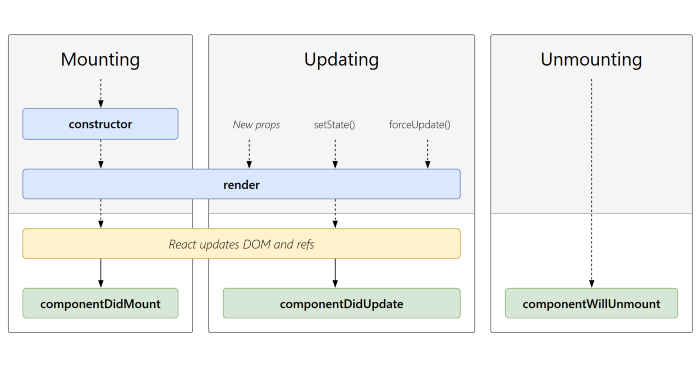
![image.png](https://cdn.hashnode.com/res/hashnode/image/upload/v1636529076261/ea59LksdU.png)

- Constructor()

This is used when we need to initialize state and bind methods to our component. The  place where this.state is explicitly assigned. 

After the render function has completed, this method will be called immediately. This is where we interface directly with the browser if we need to. We can perform an API request and use the answer to update the state of the components. We can populate the content with data from another destination. 

- componentDidMount()

After the render function has completed, this method will be called immediately. This is where we interface directly with the browser if we need to. We can perform an API request and use the answer to update the state of the components. We can populate the content with data from another destination.

- componentDidUpdate()

Called as soon as the component has been updated. The first render does not use this approach.
When the component has been changed, use this as a chance to work on the DOM. If you compare the existing props, this is also an excellent area to make network requests.

- componentDidUnmount()

The componentWillUnmount() method allows us to execute the React code when the component gets destroyed or unmounted from the DOM (Document Object Model).  Simply like destorctor in c++, generally used to perform clean-up for any DOM-elements

### Functional components
 Functional component is simple javascript function which returns JSX element. 

`Syntax:`

```js 
const <FunctionName>= () => {
 return <h1>Hello, world</h1>;
};
```
### Props
Props can be sent as args. and can be easily accessed by `props.<name>`.
```jsx 
<Component1 name="shan" />
const Component1= (props) => {
 return <h1>Hello, {props.name}</h1>;
};
```
`Note:`
Here in functional component we can directly access props by `props.name`, whereas in class we should use `this.props.name` to specify the current instance of the class component.

### Hooks
Here comen hooks, the special functions for functional components, using which we can do many stuffs like handling states ext..

- UseState Hook

```jsx
import React, { useState } from 'react';

function Example() {
  // Declare a new state variable, which we'll call "count"
  const [count, setCount] = useState(0);

  return (
    <div>
      <p>You clicked {count} times</p>
      <button onClick={() => setCount(count + 1)}>
        Click me
      </button>
    </div>
  );
}
```
In the above snippet, `const [count, setCount] = useState(0);
` where the state id initialized (count=0). And when the button is clicked, `setCount` is triggered and the count value is incremented by 1. So that the state changes whenever the button is clicked.

## Comparision

|     ClassComponent()     |     functionalComponent()     |
|----------------|---------------------|
|  A class component requires you to extend from React. Component and create a render function which returns a React element. | A functional component is just a plain JavaScript function that accepts props as an argument and returns a React element.  | 
|  Mutated i.e whenever a new state is set, the value of the previous state is completely destroyed and overridden.  |  Not mutated i.e when a setState is called, it creates a new function itself. Previous state is not completely destroyed. |
|  Has render() function |   Has no render() function  |

> Alright ppl hope it helped!, thanks for reading!
Stay tuned!! See yaa👋.
